When I was a kid in the late 2000s, we had those earlier versions of the Osram Duo Click lightbulbs. Switch once, and the lamp is at full brightness. Switch twice, and it has very low brightness, ideal when waking up in the night. I've missed that feature ever since I moved out, though I never actively looked for such a bulb.
One day a friend showed me his Philips Hue lights. I really liked that you can adjust the brightness. I realized I could recreate my old experience with it. So as an experiment I bought a few lights and a 4 button switch, this one:
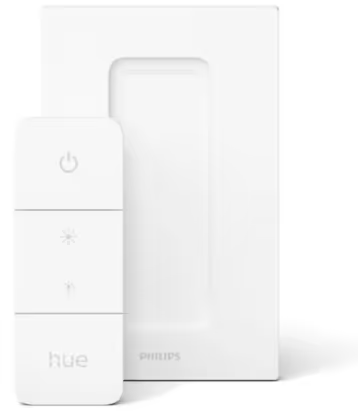
Hue also needs a bridge but I managed to snag one from a friend who ditched the Hue ecosystem for Home Assistant. (I did look into Home Assistant too but it was just too much for me; I wanted something simple to start with.) Hue doesn't need internet or a central service either. Everything can be controlled from the local network, so that sounded good enough for me. Plus, I only want controllable lights; I'm currently not looking for any other smart home widget.
I played around with Hue and I ended up liking it. I really like that I can put switches all around the place and configure them however I want.
I understand that the lights are always on and listening for commands from the bridge. So I'm wasting some electricity even when they are off and this bothered me at first. But they don't seem to add up to a lot on my electricity bill so I decided I can sort of live with this in exchange for the convenience.
I configured each of the four buttons to be an independent switch for a specific room, with this scene cycling logic:
I used the official app to configure this. However, I don't use it for controlling the lights because it takes ages to start up. For my wife I installed Hue Essentials (available in Play Store) and for myself I sideloaded https://f-droid.org/en/packages/io.github.domi04151309.home/ because that one looked even simpler.
I have not found a way to configure scene switches in apps other than in the official one. And the official app allows you to configure only the top and bottom buttons for scene cycling. The middle buttons can be configured only for dimming. I don't understand why. Maybe to sell more switches?
I started wondering how the various apps communicate and configure the system. It turns out the bridge exposes a REST API for this and that allows you to configure all buttons to scene cycle. You can go to /debug/clip.html of your bridge's https port and play with it. There's a v1 and a v2 API. I suspect the scene cycle stuff is specific to v2, and that's why most apps don't support it.
Unfortunately the API is underdocumented and the bridge only returns a generic HTTP error code without any explanation if you make a mistake. You can find a short reference of the endpoints on the Philips webpage (needs registration). But it doesn't tell you how to use it or give you usage examples. I couldn't find a good article or forum post explaining how to use it either. And I searched a lot.
Eventually I gave up and asked an AI to provide me sample code. And to my surprise it managed to come up with an almost working JSON that the bridge accepts. This really cemented my belief that AI is truly a transformative approach to how humans work with information. So I managed to get started thanks to AI.
Now I have an intent file at $HOME/.config/hue.cfg with content like below. In general the bottom three buttons of all the switches control the same main lamps in my apartment. Only the top button controls switch-specific rooms based on the switch's location. This way the buttons remain easy to remember for me. With more lamps I'd probably label the buttons on the physical switches, e.g. when I get Hue bulbs for the kitchen too.
hueaddress https://192.168.1.ADDRESS/
huekey     SOME_RANDOM_CHARACTERS_THE_BRIDGE_NEEDS

KidSwitch 0 Kid
KidSwitch 1 Office
KidSwitch 2 TV
KidSwitch 3 Hallway

BedSwitch 0 Bed
BedSwitch 1 Office
BedSwitch 2 TV
BedSwitch 3 Hallway

# The switch on the bathroom entrance switches the bedroom too.
# I don't have Hue lights in my bathroom yet.
BathSwitch 0 Bed
BathSwitch 1 Office
BathSwitch 2 TV
BathSwitch 3 Hallway
This describes my 3 switches and the 5 lamps they control.
If I want to add a new switch or reorder the buttons then I just edit the file and run huepush -apply.
The tool reads the full bridge configuration so it understands which entities the references in the config file refer to.
Then it generates a new switch configuration and pushes it.
Without the -apply flag it just prints the switches that are not matching the intent.
The code is this: https://github.com/ypsu/cfg/blob/main/huepush/huepush.go.
Requires no dependencies other than the Go standard library.
Quite easy to use for me.
Note that I configure the actual brightness levels in the app itself. I save the desired levels as scenes named "low", "mid", or "high". The switch buttons are then mapped to cycle those scenes.
(Sidenote: when I was still experimenting with various apps, one switch got into a bad state. One button was always turning off the lights and I couldn't override that behavior with the v2 API. Maybe it was a v1 API setting. Resetting the switch via removing it from the bridge and readding it solved the issue.)
I also wrote myself another small tool to adjust the light levels from my desktop. I named it lll as in "Light Level Lever" just to make it easy to type with my dominant hand. If I run it without arguments, then it displays the light levels of all my lamps.
I can use it like this to switch the lamps: lll o3t1h0.
The letters identify the light and the number sets the desired brightness.
The above sets the Office light to level 3 (full brightness), the Tv light to level 1 (minimum brightness), and turns off the Hallway light (level 0).
I also configured it to control the display backlight brightness of my desktop using DDC.
I wanted this because I use different monitor brightness and system theme depending on how much background light I have.
Previously I did this via ddcutil setvcp 10 $BRIGHTNESS but thought I would simplify this for myself.
So now I can use lll d3 for full backlight or lll d0 to set backlight level to 0% which is still a usable backlight level on my Thinkpad display.
I needed AI assistance for this too because the ioctl magic was too hardcore for me to figure out.
I asked AI to generate a code example to set brightness via ioctl and then I based my code on that.
I often use this tool because it's nicer than fiddling with the phone or walking to a switch to adjust the light. The code for this one is at https://github.com/ypsu/cfg/blob/main/lll/lll.go.
Are you happy with your traditional lights? Then I recommend sticking with them.
But if you are looking for flexibility in brightness then I can wholeheartedly recommend the Hue ecosystem. I'd expect that other similar brands could work just as well, e.g. IKEA. I went with Hue just because it's simple to start with, it has a broad selection of lights, and has a REST API for the complex needs later on. As far as I understand, the switches and lights use standardized technology so you can put them into other systems too if you change your mind later.
Buy one such light+switch+bridge combo for experimenting and then decide. That's how I started too.
I moved to a new apartment, got fancier lights, so I've made the tool a bit more flexible. Here's a snippet from my current config:
BedRoomSwitch 1 Bed.Low        Bed.Off
BedRoomSwitch 2 Bed.Mid        Bed.High
BedRoomSwitch 3 Office.Low     Office.Off
BedRoomSwitch 4 LivingRoom.Off

LivingRoomSwitch 1 TV.Ambient      TV.Off
LivingRoomSwitch 2 TV.Full
LivingRoomSwitch 3 Kitchen.Full
LivingRoomSwitch 4 Kitchen.Ambient Kitchen.Off
Each button now lists all the scenes it will cycle through. The scene list can be arbitrarily long, it no longer needs to be exactly three scenes with low/mid/high. I configure the smart-off functionality with a synthetic Off scene.
Published on 2025-12-01, last modified on 2026-05-26.
Add new comment:
(Adding a new comment or reply requires javascript.)